FAQsCan I use the Feno Smartbrush™ if I have braces?
The Smartbrush is currently not designed to work with braces, but please stay tuned as we look to optimize the brushing experience for those with braces in the near future. When the day comes for your braces to be removed, the Smartbrush will be an excellent tool to help maintain your newly straightened and beautiful smile.
We're excited to support your oral health journey, both now and in the future.
FAQsCan I use the Feno Smartbrush™ without Wi-Fi?
Yes, the Feno Smartbrush™ can function without a Wi-Fi connection. While connected features like the scanner won't be available, the basic brushing functionality remains unaffected.
FAQsCan I use traditional toothpaste with the Feno Smartbrush?
You sure can. While we highly recommend using Feno Foam to maximize your results and freshness, the Mouthpiece will work with traditional toothpaste.
FAQsCan my kids use my Feno Smartbrush?
We've heard that parents are hungry for a child-sized version of our Smartbrush, and we are working on one, but right now, our Mouthpieces are made only for adults. Please don't share your Feno Smartbrush with your kids.
FAQsHow do I know the mouthpiece size that is right for me?
To determine your correct mouthpiece size, please download our new app here:
👉 Feno App - iOS
Once downloaded, follow these steps:
- Log in using the email or phone number you used when placing your order.
- Locate the FitKit Scan button in the app.
- Follow the on-screen instructions to complete your scan - you only need to do this once.
Note: if you are using an Android device, reach out to our team to generate a unique webpage link to complete your scan.
This scan helps us determine the right size mouthpiece for you, ensuring a secure and comfortable fit that works effectively with your Smartbrush.
If you have any questions or need assistance, our support team is here to help at support@feno.co.
FAQsI have really sensitive teeth. Are the bristles soft?
Absolutely, they are actually Ultrasoft! We have tested many iterations of the bristles and mouthpieces until we created the most comfortable and effective brush.
FAQsHow often do I need to replace the Mouthpiece?
For optimal brushing results, replace every 3 months.
Join our Feno+ membership for discounts on Mouthpiece shipments and exclusive member benefits.
FAQsWhere can I track my order?
You can track your Feno order anytime using our order tracker:
👉 Track my order
Just enter your order number and email used at checkout to see the latest updates on your shipment.
---
Additional note: Have you already completed your FitKit? If not, kindly do so using our Feno App so we can get your mouthpiece size and ship your package.
FAQsCan you give me an update on my order?
You can track your Feno order anytime using our order tracker:
👉 Track my order
Just enter your order number and email used at checkout to see the latest updates on your shipment.
FAQsDo you have an affiliate program?
Yes, Feno offers an affiliate program. You can find the signup page on our website in the Affiliate Program section.
FAQsWhy are there three buttons on my device?
The Feno Smarthandle features three buttons, each with a specific function to give you full control over your brushing and scanning experience:
🔘 Power Button (Left Side - Screen Facing, Top Button)
- Turns the device on and off.
- Starts and stops brushing when pressed.
- Pauses brushing during a session.
⬆ Up Button (Right Side, Top Button)
- Activates the scanner to capture oral health data.
- Increases brushing intensity during a brushing session
⬇ Down Button (Right Side, Bottom Button)
- Stops brushing when paused (fully turning it off).
- Decreases brushing intensity during a brushing session
🔄 Reset Function
- Press and hold all three buttons simultaneously to reset the device.
FAQsHow much is the Feno Smartbrush?
The Founders Edition Bundle starts at $299 USD within the United States.
For international orders, pricing may vary slightly depending on your location. This is typically due to regional taxes, duties, shipping fees, and currency conversion.
You can place your order directly at feno.co!
FAQsDo you ship outside the US or to another country?
We're excited to share that Feno is available internationally - so customers around the world can experience a smarter approach to oral care.
For international orders, please note that processing typically takes about 4 - 6 weeks. This includes receiving and analyzing your FitKit scans, preparing your order, and completing all required documentation to meet international customs and shipping regulations. Delivery time from our warehouse to your address may also vary.
As for pricing, it may vary slightly depending on your location due to regional taxes, duties, and currency adjustments. Once you log in and enter your shipping information at checkout, you'll see the most accurate pricing for your region.
FAQsDoes the Feno Smartbrush come with a travel case?
While the Feno Smartbrush doesn't include a travel case in the current bundle, we do offer the Feno Hub - a sleek, compact charging and drying unit that doubles as a travel-friendly storage solution. However, the Hub is currently on backorder and expected to return later in 2026. In the meantime, the Snap Charger included with your device is portable and designed for on-the-go use.
FAQsHow can I cancel my Feno+ subscription?
You can cancel your Feno subscription by following these steps:
1. Go to your account page on the Feno website.
2. Log in using the email address you used to purchase your subscription.
3. Navigate to the Subscription section.
4. Select the option to Cancel Subscription and follow the prompts.
FAQsI am being billed for a subscription, but have yet to receive the toothbrush I ordered. What should I do?
Subscription charges are only processed after the delivery of the toothbrush. If any unexpected charges appear, customers can request a refund by providing the receipt to our customer support at support@feno.co.
The delivery process requires FitKit scans to determine the appropriate mouthpiece size. To complete the scans, iPhone users can download the Feno App from the App Store here. After downloading, enter the order email address and follow the prompts to complete the scan.
For Android users, please reach out to support for a custom webpage link.
FAQsDoes Feno+ include automatic refills?
Not at this time.
The Feno+ subscription does not include automatic refills.
However, it is available, and you can still enjoy the benefits of regular refills by availing our TrueFit Mouthpiece or Feno Foam subscriptions.
TrueFit Mouthpiece Subscription
Get a mouthpiece delivered every three months.
Feno Foam Refill Subscription
Stay stocked with our deep-cleaning foam.
You'll always have what you need - right when you need it.
FAQsIs the mouthpiece custom-made to my scan?
Not fully custom, but your scan allows us to match you with the best-fitting size from our range of 7 pre-manufactured sizes.
This helps ensure comfort, proper alignment, and an effective clean.
Getting StartedDoes the Smartbrush need any user technique to work effectively?
The Feno® Smartbrush is designed to be user-friendly and requires minimal technique for effective use. While the advanced technology ensures comprehensive cleaning, users should still follow a simple technique for optimal results. While the Smartbrush is on, it is recommended to move the TrueFit™ Mouthpiece in a slow circular motion. This motion helps to achieve optimal bristle contact with all areas of the teeth and gums, enhancing the brushing results.
Getting StartedHow do I clean the Feno Smartbrush™?
To ensure your Smartbrush stays in great condition, here are some quick tips on how to store it after use:
- Gently shake the mouthpiece to remove any excess water after brushing.
- Place the mouthpiece in a well-ventilated area with good air circulation to allow it to dry completely.
- Return the Smartbrush to the charger to keep it ready for your next use.
Getting StartedIs the Feno Smartbrush™ waterproof?
The Smartbrush™ has an IP 64 rating, making it resistant to everyday common water splashes. However, it should not be submerged in water or used in the bath or shower.
Getting StartedHow is the Feno Smartbrush powered?
The Feno Smartbrush is charged through the Snap Charger, which connects to any standard U.S. outlet via the included power adaptor.
Getting StartedHow do you store and use my information and brushing data?
Your privacy matters to us. Feno collects brushing and scan data to give you personalized insights and support your oral health journey. This data powers features like your Oral Health Report and brushing recommendations - but it's always stored securely and used responsibly.
For all the details - including what data we collect, how it's stored, and how it's used - check out our Privacy Policy. We're committed to transparency every step of the way.
Getting StartedHow do I update the software of my Feno Smartbrush™?
The Feno Smartbrush™ receives software updates through its Wi-Fi connection. When an update is available, follow the on-screen instructions on the device or in the Feno App to install the latest version.
Getting StartedHow do I use the Feno Smartbrush?
To use the Feno Smartbrush, rinse the Mouthpiece under running water and spread a thin layer of toothpaste (we recommend our custom-formulated Feno Foam foaming xylitol toothpaste) along both channels of the Mouthpiece.
Then, insert the Mouthpiece into your mouth, fitting the teeth into the Mouthpiece grooves, and hit the start button. While on, move the Truefit Mouthpiece in a slow circular motion for optimal bristle contact.
After 20 seconds, the Feno Smartbrush will have completed the brushing cycle. When the brushing cycle ends, rinse the Mouthpiece and place the Smartbrush in the Snap Charger to charge the device.
For a visual guide, check out our tutorial video here to see the Feno Smartbrush in action.
Getting StartedWhat can I use to clean the Feno Smartbrush™?
To keep your Feno Smartbrush in great shape, here's how to clean it properly:
🖐️ Smarthandle™ Care
- Wipe it down with a soft, damp cloth - microfiber works great.
- If needed, use a mild, non-abrasive cleaner (like gentle dish soap diluted in water).
- Never immerse it in water. The handle is water-resistant, but not waterproof.
🦷 Mouthpiece Cleaning
- Rinse the Mouthpiece with water after every use.
- After cleaning:
- Pat it dry with a clean towel
- Let it air dry in a well-ventilated area - don't store it wet or sealed
💡 Pro Tip
Avoid storing your Mouthpiece in airtight containers or travel bags while damp - this helps prevent odors and bacterial buildup.
Need tips for cleaning while traveling or wondering when to replace your Mouthpiece? We've got your back - reach out anytime.
Getting StartedHow long does the Feno Smartbrush take to fully charge the first time?
The initial charge for your Feno Smartbrush can take up to 4 hours. This is completely normal and ensures the battery is conditioned properly for long-term use.
You'll know it's fully charged when the battery icon turns green and displays "100%" on the screen.
🔋 Once fully charged, the Smartbrush should last up to 7 days with regular use.
Getting StartedIs there a light or indicator that shows the Smartbrush is charging?
Yes! When your device is correctly charging, the screen will show "Charging in Progress" and a battery icon with a green outline. After a few seconds, the screen returns to the home screen, but a small battery icon remains visible to confirm it's still charging.
Getting StartedWhen should I download the Feno app - before or after charging my brush?
You can download the app at any time, but we recommend waiting until your Smartbrush is fully charged before connecting. Once charged, open the app and follow the step-by-step setup to link your device and personalize your brushing routine.
Troubleshooting TipsHow do I dispose of the Feno Smartbrush™?
Dispose of the Feno Smartbrush™ according to local regulations for electronic devices and batteries. Do not dispose of it in regular household waste.
Troubleshooting TipsHow do I handle an error message displayed on the Feno Smartbrush™?
If your Feno Smartbrush displays an error message, don't worry - most issues can be resolved quickly. Here's what to do:
🛠 Step-by-step troubleshooting
- Restart your device
Press and hold the power button for 5 seconds, then power it back on. - Check for updates
Open the Feno App and make sure you're running the latest firmware. The app will prompt you if an update is available. - Review the error message
Look at the exact message on-screen. Common ones include:- "Wi-Fi not connected" → Make sure your Wi-Fi is active and try reconnecting in the app
- "Excessive bite pressure" → Ease up and bite gently on the Mouthpiece
- Reset Wi-Fi connection
In the app, go to Settings > Device > Reset Wi-Fi, and follow the steps to reconnect.
🔍 Still stuck?
Contact support@feno.co. We're here to help get you brushing again ASAP.
Troubleshooting TipsWhat steps should I take if the Feno® Smartbrush™ is overheating?
Immediately stop using the Smartbrush™ and unplug it from the power source. Let it cool down before attempting to use it again. If overheating recurs, avoid using the device and contact customer support for a safety check.
Troubleshooting TipsWhat is your return policy?
First, we would like to assure you that we stand behind the quality and effectiveness of our product. In the event that you receive the Feno Smartbrush and find that the sizing is not quite right for you, we offer free replacements for up to 2 mouthpieces. This ensures that you can find the perfect fit without any additional cost.
Furthermore, we offer a 30-day money-back guarantee from the date of shipment. This means that if you are not completely satisfied with the product, even after trying the replacement mouthpieces, you can return it within 30 days of the shipment date for a full refund. Simply contact our customer service team to initiate the return process.
Your satisfaction is our utmost priority, and we are confident that our product will ensure that you have a positive experience. If you have any further questions or concerns, please don't hesitate to reach out to us.
Troubleshooting TipsWhat should I do if the TrueFit™ Mouthpiece does not fit?
If your Mouthpiece doesn't feel right, don't worry - let's make sure it's seated and positioned properly before assuming there's an issue with the fit.
✅ First, try this:
Watch our quick video on how to insert and adjust your Mouthpiece:
🎥 Watch the how-to video
Key tips:
- Gently place the Mouthpiece in your mouth while the device is off
- Bite down softly - enough to hold it in place, not to squeeze it
- Wiggle your jaw slightly to ensure bristles make contact with all your teeth
⚠️ Still not fitting comfortably?
If the Mouthpiece:
- Feels too large or small
- Won't sit evenly
- Causes discomfort during use
Please stop using the device and contact us at support@feno.co. We'll help troubleshoot!
Your comfort (and smile) matters to us.
Troubleshooting TipsWhat should I do if I experience discomfort or bleeding when using the Feno Smartbrush™?
Some users may experience discomfort or minor bleeding during initial uses, this usually stops after a few days. If these symptoms persist beyond a few uses, discontinue use and consult a dental professional. Let our friendly customer support team know about your experience so we can discuss refund options for you.
Troubleshooting TipsThe scanning feature is not providing accurate results. How can I fix this?
We hope you're enjoying the oral health scanning feature of the Feno Smartbrush. To help you get the most accurate reports, we've put together some simple tips:
1. Distance matters: Hold the device about 12 inches from your face. This ensures we capture your full smile.
2. Light it right: Good front lighting is key. Natural light works well, but any clear lighting will do.
3. Stay steady: Try to keep the device as still as possible during the scan. A stable hand means clearer images.
4. Keep it straight: Hold the device directly in front of your face, not at an angle.
5. Not too close: Resist the urge to move closer than 12 inches, as this might cut off parts of the scan.
6. Open Wide: Make sure you open as wide as possible and show as much of your gums as possible. You could even take 2 - 3 scans to capture different aspects of your mouth. The more you capture, the more information we're able to use.
📱 For Apple users: We recommend scanning on our Feno App instead of the web version. It offers faster and more accurate oral health reports.
Following these guidelines will significantly improve the accuracy of your oral health reports.
If problems persist, contact our support team at support@feno.co.
Troubleshooting TipsWhat happens if the Feno Smartbrush™ stops working?
If your Feno® Smartbrush™ is malfunctioning or not working as expected, contact customer support for assistance. Avoid attempting to repair or disassemble the product yourself as this could void the warranty and cause further damage.
Troubleshooting TipsHow can I adjust the vibration intensity of my Feno device if it feels too intense?
The Feno Smartbrush doesn't use typical "vibrations" - it uses gentle translational movements designed to clean all teeth at once. That said, we know comfort is key, and you can adjust the brushing intensity both in the app and directly on the device.
🛠 Here's how to adjust the intensity:
- Open the Feno App
- Tap the brush icon (second icon on the app deck)
- Select your connected Smartbrush
- Choose "Brushing Speed"
- Use the slider to lower or increase the intensity based on your comfort level
We recommend starting on a lower setting if you're new to Feno, especially if you have sensitive teeth or gums.
🎛 To manually adjust during brushing:
You can also adjust intensity in real time during a brushing session.
Just press the up or down button on the Smarthandle to increase or decrease the brushing intensity instantly.
🔄 Not sure if it's working properly?
If the movements still feel uncomfortable or you see a "bite pressure" warning, make sure:
- You're not biting down too hard (the brush should glide, not press)
- The Mouthpiece is seated correctly - it should feel snug but not forceful
- You're using the recommended Mouthpiece size
If discomfort continues, reach out to support@feno.co and we'll help troubleshoot or explore other Mouthpiece options.
Troubleshooting TipsHow can I reset my device?
To reset your Feno Smarthandle, follow these steps:
1️⃣ Make sure the device is on. If it's off, press the Power Button to turn it on.
2️⃣ Press and hold all three buttons simultaneously (Power, Up, and Down buttons).
3️⃣ Keep holding until the device resets - this may take a few seconds.
4️⃣ Once reset, the device will restart, and you can set it up again as needed.
✅ You'll know the reset was successful if the screen shows a QR code to download the Feno App. If you don't see the QR code, try again.
Note: It can be a bit tricky to press all three buttons at the same time - this is intentional. Some buttons are designed to be slightly harder to press to prevent accidental activation or shutdown during use. So if it doesn't work the first time, give it another try with firm, even pressure.
Let us know at support@feno.co if you need help!
Troubleshooting TipsMy Mouthpiece won't "lock in" - what should I do?
The mouthpiece should snap into place with a gentle "click". If it's not clicking or keeps coming off, try removing and reattaching it with even pressure until it feels secure.
If the issue persists, please contact our support team. We'll help troubleshoot further and make sure everything is functioning as it should - and if anything isn't working properly, we'll take care of it.
Troubleshooting TipsMy Smartbrush isn't charging at all - what should I check first?
Make sure your Snap Charger is properly aligned (Feno logo facing inward), connected to a working outlet, and magnetically clicking into place. The attached photo is for reference. Currently, the snap charger works in a specific orientation.
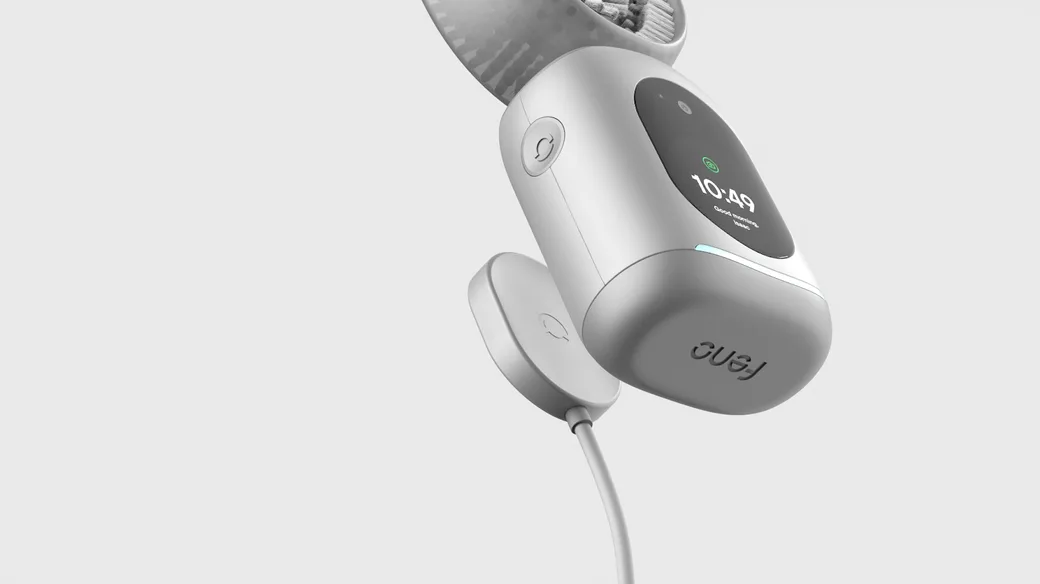
Here is a quick video showing how it is set up.
Still not charging? Contact us - you may need a replacement charger.
Troubleshooting TipsMy toothbrush says critical battery even after charging. Can you help me with this?
If your Feno Smartbrush is still showing a "Critical Battery" warning after being charged, here are a few things to check:
✅ 1. Check the charger connection
- Make sure you're using the adapter that came with your Feno kit.
- Double-check that the Snap Charger is properly attached to the back of the Smarthandle:
- The Feno logo on the charger should be upside down.
- The magnet should click into place.
🔌 Important: There is only one correct orientation for charging. Even if the magnet clicks in the wrong direction, the device won't charge. Refer to the image below for proper alignment.
You can also watch a quick video guide on using the Snap Charger here.
🔄 2. Try a device reset
If everything is connected properly but the warning still appears, a reset might help clear the issue.
Here's how to reset your Smartbrush:
- Press and hold all three buttons (Power, Up, and Down) at the same time.
- Hold for about 5 seconds until you see a QR code on the screen.
- If the QR code doesn't appear, try the reset again - it can take a couple tries.
- Once you see the QR code, try connecting it to the charger again.
💡 Tip: The buttons may feel a bit firm - this is by design to prevent accidental presses during use.
Still need help? Our support team is here for you!
Email us anytime at support@feno.co.
Troubleshooting TipsI'm connecting to the app but I'm stuck on the "Looking for Wi-Fi" page. What should I do?
Here's a quick troubleshooting guide:
- Reset the device to refresh the connection. Click here to know how.
- Uninstall and reinstall the Feno App on your phone.
- Make sure you're in an area with a strong and stable internet connection, ideally close to your Wi-Fi router.
- Check that Bluetooth permissions are enabled for the Feno App in your phone's settings - this is essential for the connection to work properly.
- Open the app and try setting up the device again. We recommend connecting to a 2.4GHz Wi-Fi network (not 5GHz) for the optimal connection.
If the issue continues, please reach out to our Support Team at support@feno.co - we're here to help!
Troubleshooting TipsI didn't receive the code after entering my email in the app. What should I do?
Please check your spam or junk folder - the OTP (one-time passcode) email may have been filtered there by mistake.
If it's not there, it's possible that you've previously unsubscribed from Feno emails, which can prevent the code from being delivered.
No worries - just email us at support@feno.co using the same email you entered in the app. Our Support Team will check for any blocks and help get you signed in smoothly.
Troubleshooting TipsMy brush isn't charging. What could be wrong?
Please confirm:
- You're using the official Feno charging adapter.
- The brush is correctly aligned on the charger (refer to the setup guide).
- You've allowed at least 30 - 60 minutes for initial charging.
Still not charging? Send us a photo or let us know - we'll troubleshoot with you.
Troubleshooting TipsThe app is stuck on a screen and won't go further. What should I do?
We recently pushed an app update to fix this issue.
Please uninstall and reinstall the Feno app. This usually resolves any screen freezing or looping issues.
If the problem persists, send us a screenshot and we'll assist right away.
Order QuestionsDo I have to have the subscription to use the smartbrush?
The Feno Smartbrush is fully functional and provides a 20-second clean without needing a Feno+ subscription.
When placing an order, you can easily deselect the Feno+ membership and proceed without it - totally your choice.
That said, our Feno+ subscription enhances your experience by unlocking features like:
- Advanced oral health scanning and oral health reports
- AI-powered insights
- Access to dental professionals
- Exclusive discounts on mouthpiece and Feno Foam refills
As a bonus, when you order the Founders Edition Bundle, you'll receive one month of Feno+ completely free, so you can try all the premium features and see the full value for yourself.
We ultimately believe in offering choices that cater to different needs and preferences, ensuring that our customers receive the best value and experience tailored to their oral healthcare requirements.
Order QuestionsIs the Feno Smartbrush comfortable to use?
Yes! The TrueFit Mouthpiece was designed with comfort as a priority. The ultra-soft bristles are gentle on teeth and gums and are fused to a semi-pliable plate that adjusts to your unique dental arch. We offer six mouthpiece sizes to fit 90%+ of dental arches. After purchasing the Feno Smartbrush, we need your FitKit scans to measure your dental arch using our app, which helps us find the right Mouthpiece size for you.
Not sure how to do your FitKit scans? Click here to know how.
Order QuestionsWhy choose Feno over other brands?
The most significant difference lies in the efficacy of clean. Our TrueFit flexible Mouthpiece has around 18,000 precisely placed ultra-soft nylon bristles, which provide a much more effective clean than silicone bristles. We paid close attention to every angle, density, and length of the bristles to ensure that they reached all the tooth surfaces and gum lines.
Additionally, we developed a much more deliberate brushing motion than vibration. Our brushing motion ensures that the bristles sweep across the teeth surfaces with minimal effort from the user.
We are committed to creating a strong clinical foundation for our products and understand the importance of research and evidence. Thus, we are excited to announce some of our clinical partnerships soon.
Stay tuned for more updates!
Order QuestionsHow is the Feno Smartbrush different from other electric toothbrushes?
The Feno Smartbrush is a radical step forward for oral health. The average toothbrush has 2,500 bristles; the Feno Smartbrush has an average of 18,000. The average toothbrush brushes each tooth one at a time; the Feno Smartbrush brushes all teeth simultaneously. The average brush cycle takes 120 seconds; the Feno Smartbrush takes 20.
The Feno Smartbrush is also the first brush that takes deep scans of your teeth and gums to provide ongoing insights into the condition of your oral health.
An astonishing 90% of individuals suffer from some form of gum disease, an oversight we aim to correct with the Feno Smartbrush, designed as the product to bridge oral health and overall health.
Order QuestionsCan I use the Feno Smartbrush if I have dental crowns?
The Feno Smartbrush can be used with permanent dental crowns that have been in place for at least 4 weeks, but only with the lowest intensity setting. We do not recommend using the Smartbrush with temporary crowns, newly placed permanent crowns (less than 4 weeks), or if you have concerns about your specific dental work.
As always, we recommend consulting your dentist before use if you have any dental restorations.
Order QuestionsCan I use the Feno Smartbrush and Feno Foam if I have sensitive teeth?
Yes! Both the Feno Smartbrush and Feno Foam are designed to be gentle for users with sensitive teeth. The Smartbrush features different speed levels letting you control the cleaning speed, while Feno foam is formulated without harsh abrasives to provide an effective yet gentle clean.
If you experience sensitivity, we recommend starting at the slowest speed and gradually adjust the speed to your comfort level. If you have any discomfort, please consult Feno for personalized advice.
Product InformationDo you offer any warranties or guarantees?
Absolutely! We stand by the quality of our products. Register your Smartbrush on the app to activate your 12-month warranty.
Product InformationDoes Feno Foam contain fluoride?
Feno Foam doesn't use fluoride because it relies on xylitol, a natural sweetener, to support enamel, boost gum health, and naturally whiten teeth, effectively providing key oral health benefits traditionally offered by fluoride.
Product InformationIs there privacy built-in with the scanner?
Yes, the Feno Smartbrush includes multiple built-in privacy features for the scanner. The device is equipped with a secondary privacy chip, ensuring that all operations related to the scanner are securely handled. This chip prevents remote access to the scanner, enhancing the security and privacy of the device. Additionally, all data collected by the scanner is encrypted, providing an added layer of security to protect users' personal information.
Product InformationIs the scanner on 24/7?
No, the scanner in the Feno Smartbrush is designed to turn on only during the use of the Smartbrush. Your Smartbrush has a built-in Trust light to show when the scanner is on.
Product InformationWhat's Feno Foam?
Feno Foam is our custom-formulated wild mint foaming toothpaste. Feno Foam is powered by xylitol, a natural, plant-based sweetener that helps support Enamel, boosts gum health, and naturally whitens teeth. Because of its foaming quality, it easily spreads across the Mouthpiece channels and reaches gaps and the gum line.
Try it now and feel the difference.
Product InformationWhat is xylitol?
Xylitol is a natural plant based sweetener that has been shown to support enamel and boosts gum health. We use it across our line of oral care products, as it has been shown to support enamel, boost gum health, and naturally whiten teeth.
Product InformationHow can I stay updated with Feno's latest products and offers?
Join our newsletter for exclusive updates, offers, and oral care tips from our community of experts.
Product InformationWhat's the best way to store my Feno Smartbrush while traveling?
Until the Hub is back in stock, most users store their Smartbrush in a breathable toiletry bag or padded case with the Snap Charger detached. Avoid keeping it in a wet towel or airtight bag - and always make sure the Mouthpiece is dry before packing. We're actively exploring travel kit options!
Product InformationWhat is Feno+?
Feno+ is our premium membership that enhances your Feno experience with advanced oral health insights, personalized support, up to 50% discounts on refills, and exclusive perks - all accessed through the Feno App.
Product InformationWhat do I get from being a Feno+ member?
As a Feno+ member, you get a more advanced, personalized oral health experience designed to help you stay on top of your wellness goals. Here's what's included:
Advanced Oral Health Reports
- Get deeper scan analysis and progress tracking directly through the Feno App, so you can see how your oral health is improving over time.
Direct Access to Dental Coaches
- Chat with our licensed Dental Coaches for real-time guidance, brushing tips, and personalized support.
Premium App Features
- Unlock advanced brushing analytics, historical trends, and enhanced customization of your Smartbrush settings.
🛍 Exclusive Member Discounts
- Enjoy special pricing on refills like Feno Foam and TrueFit Mouthpieces.
No answer matches that yet
Try fewer letters, or clear the topic and search the whole library.